<br />
<b>Warning</b>:  Cannot modify header information - headers already sent by (output started at /var/www/ikonoform.com/public_html/wp-content/plugins/gravityforms/common.php:1234) in <b>/var/www/ikonoform.com/public_html/wp-includes/feed-rss2.php</b> on line <b>8</b><br />
<?xml version="1.0" encoding="UTF-8"?><rss version="2.0"
	xmlns:content="http://purl.org/rss/1.0/modules/content/"
	xmlns:wfw="http://wellformedweb.org/CommentAPI/"
	xmlns:dc="http://purl.org/dc/elements/1.1/"
	xmlns:atom="http://www.w3.org/2005/Atom"
	xmlns:sy="http://purl.org/rss/1.0/modules/syndication/"
	xmlns:slash="http://purl.org/rss/1.0/modules/slash/"
	>

<channel>
	<title>Ikonoform</title>
	<atom:link href="https://ikonoform.com/feed/" rel="self" type="application/rss+xml" />
	<link>https://ikonoform.com</link>
	<description>High-End 3D Visualizations for Architecture &#38; Design</description>
	<lastBuildDate>Thu, 07 Mar 2024 11:00:10 +0000</lastBuildDate>
	<language>en-US</language>
	<sy:updatePeriod>
	hourly	</sy:updatePeriod>
	<sy:updateFrequency>
	1	</sy:updateFrequency>
	<generator>https://wordpress.org/?v=6.8.5</generator>

<image>
	<url>https://ikonoform.com/wp-content/uploads/2016/07/cropped-Ikonoform_solo_512px-32x32.jpg</url>
	<title>Ikonoform</title>
	<link>https://ikonoform.com</link>
	<width>32</width>
	<height>32</height>
</image> 
	<item>
		<title>3ds Max Asset Tracker Won&#8217;t Open</title>
		<link>https://ikonoform.com/3ds-max-asset-tracker-wont-open/</link>
		
		<dc:creator><![CDATA[Jens Suhr Andersen]]></dc:creator>
		<pubDate>Thu, 07 Mar 2024 18:55:00 +0000</pubDate>
				<category><![CDATA[Tips & Tricks]]></category>
		<category><![CDATA[3ds max]]></category>
		<category><![CDATA[asset tracker]]></category>
		<category><![CDATA[assets]]></category>
		<category><![CDATA[bugs]]></category>
		<category><![CDATA[workflow]]></category>
		<guid isPermaLink="false">http://ikonoform.com/?p=54779</guid>

					<description><![CDATA[*Updated March 2024* happened to me again in max 2023, but the latest version of connecter app won&#8217;t have the context menu I talked about in the 2017 update below. To get the &#8220;asset tracking&#8221; button in newer versions of connecter, you have to right...]]></description>
										<content:encoded><![CDATA[<p><em>*Updated March 2024* happened to me again in max 2023, but the latest version of connecter app won&#8217;t have the context menu I talked about in the 2017 update below. To get the &#8220;asset tracking&#8221; button in newer versions of connecter, you have to right click a scene object in 3ds max, and here you can select &#8220;Connecter Preferences&#8221;. This will again allow you to open Asset Tracking via the button in the menu that opened.</em></p>
<h4>What happened?</h4>
<p>Every now and then I&#8217;m not able to open the &#8220;Asset Tracker&#8221; in 3ds max. I&#8217;ve tried using the shortcut (shift+T) and clicking to it via the menu, but nothing happens. Apparently I&#8217;m not the only one, so I thought I&#8217;d share what I have found out works pretty great.</p>
<p>Sometimes the asset tracker window would be hiding outside the desktop area or on my second monitor. To check this, the first thing I do is to try open up asset tracking (so the window in theory would be selected). Hold down the windows button and then click your left/right arrow key a couple of times to see if it shows up on screen again.</p>
<p>If this didn&#8217;t work,  I used to deleted the whole ENU folder as suggested on <span style="color: #00ccff;"><a style="color: #00ccff;" href="https://knowledge.autodesk.com/support/3ds-max/troubleshooting/caas/sfdcarticles/sfdcarticles/Resetting-3ds-Max-3ds-Max-Design.html" target="_blank" rel="noopener">Autodesk&#8217;s own site</a>.</span></p>
<p>The big problem here is that while all your problems are pretty likely to go away, you&#8217;ll loose all of your customized interface settings and have to set everything up again. This can be a huge pain.</p>
<h4>Updated quicker solution (19-10-2017)</h4>
<p>It&#8217;s been a while since this bug has happened to me, but today it did! Even though the original solution I posted last year still works great, it is a hassle. So try this first and if it doesn&#8217;t work for you, just skip this section and go to the original one.</p>
<ol>
<li>Download the <a href="https://www.designconnected.com/connecter/" target="_blank" rel="noopener"><span style="color: #00ccff;">Connecter app</span></a> for 3ds max (amazing assets app btw.)</li>
<li>Drag one of your assets into the 3ds max viewport</li>
<li>Click &#8220;About/Config&#8230;&#8221;<br />
<a href="https://ikonoform.com/wp-content/uploads/2016/11/connecter_asset_about_config_button.jpg"><img fetchpriority="high" decoding="async" class="size-full wp-image-55845 aligncenter" src="https://ikonoform.com/wp-content/uploads/2016/11/connecter_asset_about_config_button.jpg" alt="" width="233" height="375" srcset="https://ikonoform.com/wp-content/uploads/2016/11/connecter_asset_about_config_button.jpg 233w, https://ikonoform.com/wp-content/uploads/2016/11/connecter_asset_about_config_button-186x300.jpg 186w" sizes="(max-width: 233px) 100vw, 233px" /></a></li>
<li>Click &#8220;3ds Max: Asset Tracking&#8230;&#8221;<br />
<a href="https://ikonoform.com/wp-content/uploads/2016/11/connecter_asset_track_button.jpg"><img decoding="async" class="size-full wp-image-55846 aligncenter" src="https://ikonoform.com/wp-content/uploads/2016/11/connecter_asset_track_button.jpg" alt="" width="306" height="390" srcset="https://ikonoform.com/wp-content/uploads/2016/11/connecter_asset_track_button.jpg 306w, https://ikonoform.com/wp-content/uploads/2016/11/connecter_asset_track_button-235x300.jpg 235w" sizes="(max-width: 306px) 100vw, 306px" /></a></li>
<li>Voila!</li>
</ol>
<h4>A more targeted solution</h4>
<p>I&#8217;ve spend a few hours on tracking down the thing in the ENU folder that was causing this bug. I started out by deleting stuff in the ENU folder systematically. Then I started up max to see if the bug was gone, if not: repeat. When I finally found the file that was the problem, I took the same approach and started deleting lines of &#8220;code&#8221; inside the file until the bug was gone. Slowly I narrowed it down to this line of text (marked in yellow) in the 3dsmax.ini file:</p>
<p><a href="//ikonoform.com/wp-content/uploads/2016/11/Bug_missing_Asset_Tracker_3ds_max_solution.jpg"><img decoding="async" class="wp-image-54786 size-full aligncenter" src="//ikonoform.com/wp-content/uploads/2016/11/Bug_missing_Asset_Tracker_3ds_max_solution.jpg" width="570" height="72" srcset="https://ikonoform.com/wp-content/uploads/2016/11/Bug_missing_Asset_Tracker_3ds_max_solution.jpg 570w, https://ikonoform.com/wp-content/uploads/2016/11/Bug_missing_Asset_Tracker_3ds_max_solution-300x38.jpg 300w" sizes="(max-width: 570px) 100vw, 570px" /></a></p>
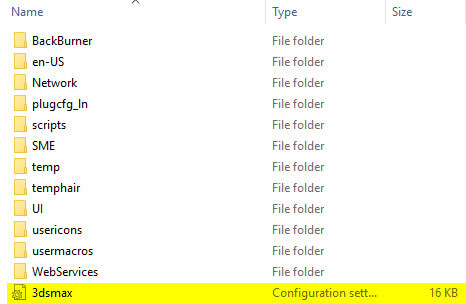
<p>The file is just inside the ENU folder as seen below.</p>
<p><a href="//ikonoform.com/wp-content/uploads/2016/11/3dsmax_ini_file.jpg"><img loading="lazy" decoding="async" class="size-full wp-image-54787 aligncenter" src="//ikonoform.com/wp-content/uploads/2016/11/3dsmax_ini_file.jpg" alt="3dsmax_ini_file" width="466" height="304" srcset="https://ikonoform.com/wp-content/uploads/2016/11/3dsmax_ini_file.jpg 466w, https://ikonoform.com/wp-content/uploads/2016/11/3dsmax_ini_file-300x196.jpg 300w" sizes="auto, (max-width: 466px) 100vw, 466px" /></a></p>
<p>To fix the asset tracker not opening, do the following:</p>
<ol>
<li>Close all instances of 3ds max</li>
<li>Navigate to: <i>C:\Users\%username%\AppData\Local\Autodesk\3dsMax\2016 &#8211; 64bit\ENU</i></li>
<li>Open the 3dsmax.ini file (right click and &#8220;open with&#8221; notepad)</li>
<li>Find the line above that I&#8217;ve marked in yellow: <em><span style="text-decoration: underline;">InstallPath=C:\Program Files\Autodesk\3ds Max 2016\</span> </em>(your&#8217;s might end in 2017 or what ever version you have)</li>
<li>Delete that line and click save</li>
</ol>
<p>When you start up max the next time you&#8217;ll be met with the unit conversion pop-up (just click ok) and the template startup screen. Everything else should be intact.</p>
<p>I&#8217;m still not sure what is causing this bug, but this fix will have your asset tracking working again quickly without messing up your interface.</p>
]]></content:encoded>


			</item>
		<item>
		<title>3ds Max Scene States Won&#8217;t Open</title>
		<link>https://ikonoform.com/3ds-max-scene-states-wont-open/</link>
		
		<dc:creator><![CDATA[Jens Suhr Andersen]]></dc:creator>
		<pubDate>Mon, 02 Apr 2018 13:30:07 +0000</pubDate>
				<category><![CDATA[Tips & Tricks]]></category>
		<category><![CDATA[3ds max]]></category>
		<category><![CDATA[asset tracker]]></category>
		<category><![CDATA[assets]]></category>
		<category><![CDATA[bugs]]></category>
		<category><![CDATA[workflow]]></category>
		<guid isPermaLink="false">https://ikonoform.com/?p=56025</guid>

					<description><![CDATA[This &#8220;fix&#8221; was tested on a Win10 PC with 3ds max 2016 and a 3Dconnexion SpaceMouse Pro, so I can&#8217;t guarantee it will work for you. &#160; How to fix it If you are having problems trying to open the Scene States in 3ds max...]]></description>
										<content:encoded><![CDATA[<p><em>This &#8220;fix&#8221; was tested on a Win10 PC with 3ds max 2016 and a 3Dconnexion SpaceMouse Pro, so I can&#8217;t guarantee it will work for you.</em></p>
<p>&nbsp;</p>
<h4>How to fix it</h4>
<p>If you are having problems trying to open the Scene States in 3ds max and you are using a 3Dconnexion product (like the SpaceMouse Pro I&#8217;m using), go <span style="color: #00ccff;"><a style="color: #00ccff;" href="https://www.3dconnexion.com/service/drivers.html" target="_blank" rel="noopener">download the latest driver</a></span>, reboot and you should once again have your Scene States back!</p>
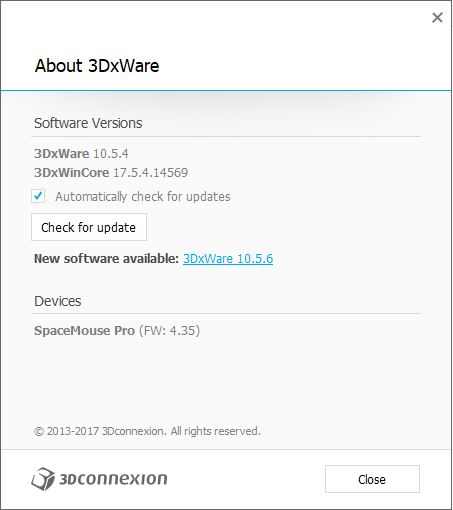
<p><a href="https://ikonoform.com/wp-content/uploads/2018/04/3dconnextion-driver.jpg"><img loading="lazy" decoding="async" class="aligncenter size-full wp-image-56026" src="https://ikonoform.com/wp-content/uploads/2018/04/3dconnextion-driver.jpg" alt="" width="453" height="510" srcset="https://ikonoform.com/wp-content/uploads/2018/04/3dconnextion-driver.jpg 453w, https://ikonoform.com/wp-content/uploads/2018/04/3dconnextion-driver-266x300.jpg 266w" sizes="auto, (max-width: 453px) 100vw, 453px" /></a></p>
<p>As you can see from my screenshot I&#8217;m using the 10.5.4 version and there is now a newer driver, but I simply don&#8217;t dare to update now it&#8217;s finally working! I&#8217;m pretty sure the latest one should work for you too, but in case it doesn&#8217;t let me know and I still have the 10.5.4 installer I can send for you to try.</p>
<p>&nbsp;</p>
<p>Good luck!</p>
<p>&nbsp;</p>
<p>&nbsp;</p>
]]></content:encoded>


			</item>
		<item>
		<title>Interview regarding my work and thoughts on the industry.</title>
		<link>https://ikonoform.com/interview-the-liquid-state-of-freelancing/</link>
		
		<dc:creator><![CDATA[Jens Suhr Andersen]]></dc:creator>
		<pubDate>Mon, 12 Mar 2018 11:55:57 +0000</pubDate>
				<category><![CDATA[News]]></category>
		<category><![CDATA[advice]]></category>
		<category><![CDATA[business]]></category>
		<category><![CDATA[clients]]></category>
		<category><![CDATA[Entrepreneur]]></category>
		<guid isPermaLink="false">https://ikonoform.com/?p=55986</guid>

					<description><![CDATA[The Liquid State of Freelancing &#160; What does this even mean? &#160; A couple of days ago, I was interviewed by Fabio Palvelli (the founder of the D2 Conference in Vienna) regarding my work and thoughts on the industry. &#160; It&#8217;s probably easier if you...]]></description>
										<content:encoded><![CDATA[<div class="wpb-content-wrapper"><h3>The Liquid State of Freelancing</h3>
<p>&nbsp;</p>
<p>What does this even mean?</p>
<p>&nbsp;</p>
<p>A couple of days ago, I was interviewed by Fabio Palvelli (the founder of the D2 Conference in Vienna) regarding my work and thoughts on the industry.</p>
<p>&nbsp;</p>
<p>It&#8217;s probably easier if you just watch the interview <img src="https://s.w.org/images/core/emoji/16.0.1/72x72/1f609.png" alt="😉" class="wp-smiley" style="height: 1em; max-height: 1em;" /></p>
<p>&nbsp;</p>
<p>Here&#8217;s the video:</p>
<p>&nbsp;</p>
<p>[/vc_column_text][/vc_column][/vc_row]<div      class="vc_row wpb_row section " style=' text-align:left;'><div class=" full_section_inner clearfix"><div class="wpb_column vc_column_container vc_col-sm-12"><div class="vc_column-inner"><div class="wpb_wrapper">
	<div class="wpb_video_widget wpb_content_element vc_clearfix   vc_video-aspect-ratio-169 vc_video-el-width-100 vc_video-align-center" >
		<div class="wpb_wrapper">
			
			<div class="wpb_video_wrapper"><iframe loading="lazy" title="The &quot;liquid state of freelancing&quot; with Jens Suhr Andersen of Ikonoform" width="500" height="281" src="https://www.youtube.com/embed/WWXSfY__-Ho?feature=oembed" frameborder="0" allow="accelerometer; autoplay; clipboard-write; encrypted-media; gyroscope; picture-in-picture; web-share" allowfullscreen></iframe></div>
		</div>
	</div>
</div></div></div></div></div>
</div>]]></content:encoded>


			</item>
		<item>
		<title>Merry Christmas 2017</title>
		<link>https://ikonoform.com/merry-christmas-2017/</link>
		
		<dc:creator><![CDATA[Jens Suhr Andersen]]></dc:creator>
		<pubDate>Sun, 24 Dec 2017 12:25:08 +0000</pubDate>
				<category><![CDATA[Articles]]></category>
		<category><![CDATA[advice]]></category>
		<category><![CDATA[business]]></category>
		<category><![CDATA[christmas]]></category>
		<category><![CDATA[clients]]></category>
		<category><![CDATA[Entrepreneur]]></category>
		<category><![CDATA[thankful]]></category>
		<guid isPermaLink="false">https://ikonoform.com/?p=55893</guid>

					<description><![CDATA[Here is this year&#8217;s Christmas 3D visualization &#160; Well, 2017 has been a good one. &#160; I was able to quit my day job, focus 100% on Ikonoform and for the past couple of months, I have gotten comfortable in a proper office instead of...]]></description>
										<content:encoded><![CDATA[<h3>Here is this year&#8217;s Christmas 3D visualization</h3>
<p>&nbsp;</p>
<p>Well, 2017 has been a good one.</p>
<p>&nbsp;</p>
<p>I was able to quit my day job, focus 100% on Ikonoform and for the past couple of months, I have gotten comfortable in a proper office instead of working from home.</p>
<p>&nbsp;</p>
<p>Both has it&#8217;s pros and cons, but I highly recommend a real office if you have kids <img src="https://s.w.org/images/core/emoji/16.0.1/72x72/1f605.png" alt="😅" class="wp-smiley" style="height: 1em; max-height: 1em;" /></p>
<p>&nbsp;</p>
<p>It&#8217;s been a grind, but things are finally moving fast and I can&#8217;t wait for what 2018 has in store.</p>
<p>&nbsp;</p>
<p>Most importantly though; my family is well. It&#8217;s odd how we take something like that for granted.</p>
<p>&nbsp;</p>
<p>I hope you all get to spend the holidays with your loved ones and have a fantastic new year!</p>
]]></content:encoded>


			</item>
		<item>
		<title>AVD Conference 2017</title>
		<link>https://ikonoform.com/avd-conference-2017/</link>
		
		<dc:creator><![CDATA[Jens Suhr Andersen]]></dc:creator>
		<pubDate>Fri, 29 Sep 2017 10:26:45 +0000</pubDate>
				<category><![CDATA[Articles]]></category>
		<category><![CDATA[advice]]></category>
		<category><![CDATA[business]]></category>
		<category><![CDATA[clients]]></category>
		<category><![CDATA[Entrepreneur]]></category>
		<category><![CDATA[free work]]></category>
		<guid isPermaLink="false">http://ikonoform.com/?p=55807</guid>

					<description><![CDATA[Last week I attended the AVD (Architectural Visualization Days) Conference in Gothenburg, Sweden. It was a blast! Here is a quick write up of my trip.     Getting there I drove. 3.5 hours. In the rain. &#160; Great fun. Accommodation I thought I was...]]></description>
										<content:encoded><![CDATA[<p>Last week I attended the AVD (Architectural Visualization Days) Conference in Gothenburg, Sweden. It was a blast!</p>
<div class="separator  transparent left  " style="border-style: dashed"></div>

<p>Here is a quick write up of my trip.</p>
<h6> <div class="separator  solid left  " style="border-bottom-width:1px;border-style: dashed"></div>
</h6>
<h6></h6>
<h6> <div class="separator  transparent left  " style="border-style: dashed"></div>
</h6>
<h4>Getting there</h4>
<div class="separator  transparent left  " style="border-style: dashed"></div>

<p>I drove. 3.5 hours. In the rain.</p>
<p>&nbsp;</p>
<p>Great fun.</p>
<div class="separator  transparent left  " style="border-style: dashed"></div>

<h4>Accommodation</h4>
<div class="separator  transparent left  " style="border-style: dashed"></div>

<p>I thought I was pretty clever bringing the car with me.</p>
<ul>
<li>I didn&#8217;t have to book the rather expensive SAS Radisson hotel right next to the venue</li>
<li>I could choose any awesome airbnb penthouse in the area instead</li>
<li>I wasn&#8217;t dependent on public transportation and could easily commute to the conference</li>
</ul>
<div class="separator  transparent left  " style="border-style: dashed"></div>

<p>Genius.</p>
<div class="separator  transparent left  " style="border-style: dashed"></div>

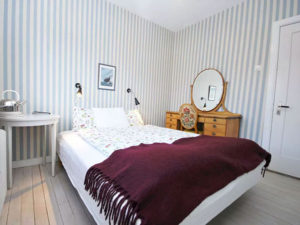
<p>Being super comfortable with my masculinity and baffled by the prices of airbnb penthouses, this place hit a sweet spot in location, price and most of all availability (I was a bit late on the booking part).</p>
<div class="separator  transparent left  " style="border-style: dashed"></div>

<p><img loading="lazy" decoding="async" class=" wp-image-55810 aligncenter" src="http://ikonoform.com/wp-content/uploads/2017/09/room01-300x225.jpg" alt="" width="400" height="300" srcset="https://ikonoform.com/wp-content/uploads/2017/09/room01-300x225.jpg 300w, https://ikonoform.com/wp-content/uploads/2017/09/room01.jpg 600w" sizes="auto, (max-width: 400px) 100vw, 400px" /></p>
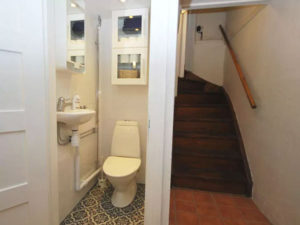
<h6 style="text-align: center;"><img loading="lazy" decoding="async" class=" wp-image-55811 aligncenter" src="http://ikonoform.com/wp-content/uploads/2017/09/toilet01-300x225.jpg" alt="" width="400" height="300" srcset="https://ikonoform.com/wp-content/uploads/2017/09/toilet01-300x225.jpg 300w, https://ikonoform.com/wp-content/uploads/2017/09/toilet01.jpg 600w" sizes="auto, (max-width: 400px) 100vw, 400px" />So much for the penthouse experience&#8230;</h6>
<div class="separator  transparent left  " style="border-style: dashed"></div>

<p>The plan was to get some work done while not at the conference. Hence the table (no matter the romantic style) would be a great fit for the laptop. This didn&#8217;t work out that well as it had apparently just been replaced by a sink and mini fridge&#8230;</p>
<div class="separator  transparent left  " style="border-style: dashed"></div>

<p>First world problems. All good <img src="https://s.w.org/images/core/emoji/16.0.1/72x72/1f642.png" alt="🙂" class="wp-smiley" style="height: 1em; max-height: 1em;" /></p>
<div class="separator  transparent left  " style="border-style: dashed"></div>

<h4>The Venue</h4>
<div class="separator  transparent left  " style="border-style: dashed"></div>

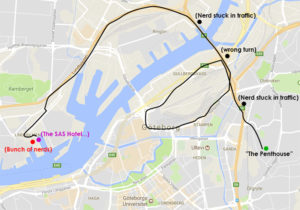
<p>Not having accounted for the heavy <strong><em>heavy</em></strong> morning traffic (leaving me to question my accommodation choice once again), I arrived at Lindholmen Science Park where the conference took place.</p>
<div class="separator  transparent left  " style="border-style: dashed"></div>

<p><img loading="lazy" decoding="async" class=" wp-image-55816 aligncenter" src="http://ikonoform.com/wp-content/uploads/2017/09/journeyAVD-300x210.jpg" alt="" width="600" height="420" srcset="https://ikonoform.com/wp-content/uploads/2017/09/journeyAVD-300x210.jpg 300w, https://ikonoform.com/wp-content/uploads/2017/09/journeyAVD-768x538.jpg 768w, https://ikonoform.com/wp-content/uploads/2017/09/journeyAVD.jpg 800w, https://ikonoform.com/wp-content/uploads/2017/09/journeyAVD-700x490.jpg 700w" sizes="auto, (max-width: 600px) 100vw, 600px" /></p>
<h6 style="text-align: center;">Round and round we go!</h6>
<div class="separator  transparent left  " style="border-style: dashed"></div>

<p>&nbsp;</p>
<p>Parking was quite expensive, but once that was over with I walked in to a pretty great setting.</p>
<div class="separator  transparent left  " style="border-style: dashed"></div>

<p><strong>Breakfast!</strong></p>
<div class="separator  transparent left  " style="border-style: dashed"></div>

<p>I have to say. This conference had the best food arrangement of any arch viz related ones I&#8217;ve been to &#8211; <em>take note here Fabio!</em></p>
<div class="separator  transparent left  " style="border-style: dashed"></div>

<p>It might not be something everyone appreciates, but I sure did.</p>
<div class="separator  transparent left  " style="border-style: dashed"></div>

<p>Solid breakfast every morning. Good coffee in the breaks. Really good lunch and a couple of snacks here and there. Everything nicely presented and a super professional staff. I have to say that these guys (gals actually) had things tuned to perfection. It was a pleasure.</p>
<div class="separator  transparent left  " style="border-style: dashed"></div>

<h4>&lt; 100</h4>
<div class="separator  transparent left  " style="border-style: dashed"></div>

<p>The venue was quite small. I think we were around 90 people. Simply because there wasn&#8217;t room for more.</p>
<div class="separator  transparent left  " style="border-style: dashed"></div>

<p>It was quite nice. It allowed for a better way of interacting with people as you could actually remember faces and people weren&#8217;t scattered far and beyond.</p>
<div class="separator  transparent left  " style="border-style: dashed"></div>

<p>There was one auditorium to fit the less than 100 nerds. It had one big ass screen for the speakers to present on. Quite the setting and how I wish this type of screen could be a standard at presentations.</p>
<div class="separator  transparent left  " style="border-style: dashed"></div>

<p>The conference lasted two days.</p>
<div class="separator  transparent left  " style="border-style: dashed"></div>

<ul>
<li>Day 1 had presentations from studios in the industry</li>
<li>Day 2 was packed with training sessions from Corona, iToo and Vray.</li>
</ul>
<div class="separator  transparent left  " style="border-style: dashed"></div>

<h4>Marc Good(for the)win</h4>
<div class="separator  transparent left  " style="border-style: dashed"></div>

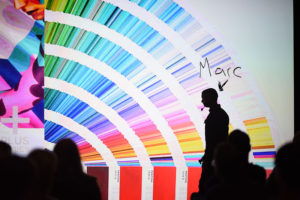
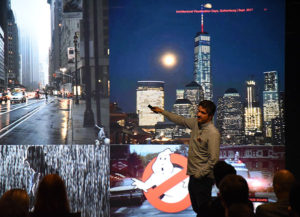
<p>One of the speakers were architectural photographer Marc Goodwin from <span style="color: #00ccff;"><a href="https://archmospheres.com/" target="_blank" rel="noopener">Archmospheres</a></span> (don&#8217;t know how to pronounce it? Dont&#8217; worry. Not even Marc knows).</p>
<div class="separator  transparent left  " style="border-style: dashed"></div>

<p><img loading="lazy" decoding="async" class=" wp-image-55821 aligncenter" src="http://ikonoform.com/wp-content/uploads/2017/09/marc_presenting_avd-300x200.jpg" alt="" width="601" height="400" srcset="https://ikonoform.com/wp-content/uploads/2017/09/marc_presenting_avd-300x200.jpg 300w, https://ikonoform.com/wp-content/uploads/2017/09/marc_presenting_avd-768x513.jpg 768w, https://ikonoform.com/wp-content/uploads/2017/09/marc_presenting_avd.jpg 800w, https://ikonoform.com/wp-content/uploads/2017/09/marc_presenting_avd-700x467.jpg 700w" sizes="auto, (max-width: 601px) 100vw, 601px" /></p>
<h6 style="text-align: center;">Marc Goodwin presenting</h6>
<div class="separator  transparent left  " style="border-style: dashed"></div>

<p>This guy was my highlight of the conference. I had never heard of him before, but his images and presentation blew me away.</p>
<div class="separator  transparent left  " style="border-style: dashed"></div>

<p>It was both highly entertaining and thought provoking. He managed to get the audience involved and was a beast at presenting. Such relaxed. Much wow.</p>
<div class="separator  transparent left  " style="border-style: dashed"></div>

<p>If you ever get the chance to hear him present. Go!</p>
<div class="separator  transparent left  " style="border-style: dashed"></div>

<h6>&#8211; I&#8217;m still waiting on that follow back on Instagram you promised me Marc&#8230;</h6>
<div class="separator  transparent left  " style="border-style: dashed"></div>

<h4>Day 2</h4>
<div class="separator  transparent left  " style="border-style: dashed"></div>

<p>The AVD conference is trying to create a meeting place for people in the industry, but also for people interested in the industry.</p>
<div class="separator  transparent left  " style="border-style: dashed"></div>

<p>Day 2 featured small workshops from some of the most used tools we have in arch viz. It was a great way to get to ask questions directly to the companies and learn a new thing or two.</p>
<div class="separator  transparent left  " style="border-style: dashed"></div>

<p>Kudos to all of the presenters in the workshop. They managed to make it relevant to the audience by making it very hands on and allowing for as many questions we had.</p>
<div class="separator  transparent left  " style="border-style: dashed"></div>

<h4>Wrapping up</h4>
<div class="separator  transparent left  " style="border-style: dashed"></div>

<p>Despite some initial minor setbacks on my journey, this was a fantastic trip. I met some wonderful new people. Reconnected with a couple of others I met at the D2 in 2016 (shout out to Jason and Erik!). I picked up some great tips for Corona and iToo&#8217;s software and had great fun.</p>
<div class="separator  transparent left  " style="border-style: dashed"></div>

<p>Next year I will definitely stay closer to the venue so I&#8217;m not reliant on the car to get there. People continued their chats out about in the city of Gothenburg and I&#8217;m bummed I didn&#8217;t bother to tag along.</p>
<div class="separator  transparent left  " style="border-style: dashed"></div>

<p>Sadly, I had to limit my after hours beer intake and drive the stupid car back to &#8220;the penthouse&#8221;.</p>
<p>&nbsp;</p>
<div class="separator  transparent left  " style="border-style: dashed"></div>

<h6><img loading="lazy" decoding="async" class=" wp-image-55832 aligncenter" src="http://ikonoform.com/wp-content/uploads/2017/09/jason-luxigon-300x217.jpg" alt="" width="600" height="434" srcset="https://ikonoform.com/wp-content/uploads/2017/09/jason-luxigon-300x217.jpg 300w, https://ikonoform.com/wp-content/uploads/2017/09/jason-luxigon.jpg 600w" sizes="auto, (max-width: 600px) 100vw, 600px" /></h6>
<h6 style="text-align: center;">My man Jason representing the amazing french madhouse (Luxigon)</h6>
<h6> <div class="separator  solid left  " style="border-bottom-width:1px;border-style: dashed"></div>
</h6>
<h6>All images from the event was kindly provided by AVD.</h6>
<h6></h6>
<p>&nbsp;</p>
]]></content:encoded>


			</item>
		<item>
		<title>Should You Work For Free?</title>
		<link>https://ikonoform.com/should-you-work-for-free/</link>
		
		<dc:creator><![CDATA[Jens Suhr Andersen]]></dc:creator>
		<pubDate>Thu, 20 Apr 2017 18:04:52 +0000</pubDate>
				<category><![CDATA[Articles]]></category>
		<category><![CDATA[How-To]]></category>
		<category><![CDATA[advice]]></category>
		<category><![CDATA[business]]></category>
		<category><![CDATA[clients]]></category>
		<category><![CDATA[Entrepreneur]]></category>
		<category><![CDATA[free work]]></category>
		<guid isPermaLink="false">https://ikonoform.com/?p=55185</guid>

					<description><![CDATA[The short answer is: Yes, but it depends on your situation and there’s a key element to always remember.  I’ve worked for free and will probably do it again, but not if you ask me to! So please don’t bother 😉 My friend and fellow CG...]]></description>
										<content:encoded><![CDATA[<h6><em>The short answer is: Yes, but it depends on your situation and there’s a key element to always remember. </em></h6>
<h6><em>I’ve worked for free and will probably do it again, but not if you ask me to! So please don’t bother <img src="https://s.w.org/images/core/emoji/16.0.1/72x72/1f609.png" alt="😉" class="wp-smiley" style="height: 1em; max-height: 1em;" /></em></h6>
<h6><div class="separator  transparent left  " style="border-style: dashed"></div>
</h6>
<h6><em>My friend and fellow CG artist Fabio Palvelli spoke on this subject in one of his great vlogs: <a href="https://youtu.be/8HNjTF4agGw"><span style="color: #00ccff;">Youtube video.</span></a> </em></h6>
<h6><em>He covers some of the common questions on the matter and this post is what I feel should be added to the delicate topic. </em></h6>
<h6><div class="separator  transparent left  " style="border-style: dashed"></div>
</h6>
<h6><em>Go check him out, he is known to be funny on occasions &#8211; oh and he is also the face of the amazing D2 Conference <span style="color: #00ccff;"><a style="color: #00ccff;" href="https://ikonoform.com/lonely-artist-no-more/">I wrote about last year.</a> </span></em><em>(I really should get paid for all this praise&#8230;)</em></h6>
<div class="separator  transparent left  " style="border-style: dashed"></div>

<div class="separator  normal left  " style="border-style: solid"></div>

<div class="separator  transparent left  " style="border-style: dashed"></div>

<h4>Creatives Are Weird</h4>
<div class="separator  transparent left  " style="border-style: dashed"></div>

<p>The creative business is an odd business. There’s no denying it.</p>
<div class="separator  transparent left  " style="border-style: dashed"></div>

<p>In most industries, “free” always comes with a catch, but we as creatives tend to be so passionate about our field of work and enjoy it so much (at times), that doing work for free isn’t just something that happens once in a while, it’s almost expected of us.</p>
<div class="separator  transparent left  " style="border-style: dashed"></div>

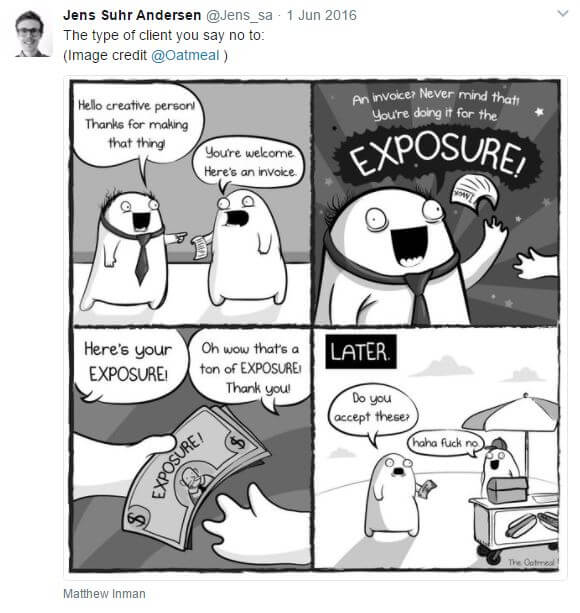
<p>So when a potential client expects you to work for free, there&#8217;s nothing like a good tweet:</p>
<div class="separator  transparent left  " style="border-style: dashed"></div>

<p><a href="https://ikonoform.com/wp-content/uploads/2017/04/Exposure_Tweet.jpg"><img loading="lazy" decoding="async" class="aligncenter size-full wp-image-55195" src="https://ikonoform.com/wp-content/uploads/2017/04/Exposure_Tweet.jpg" alt="" width="580" height="613" srcset="https://ikonoform.com/wp-content/uploads/2017/04/Exposure_Tweet.jpg 580w, https://ikonoform.com/wp-content/uploads/2017/04/Exposure_Tweet-284x300.jpg 284w" sizes="auto, (max-width: 580px) 100vw, 580px" /></a></p>
<div class="separator  transparent left  " style="border-style: dashed"></div>
<br />
Everyone&#8217;s life situation is different, but working for free is thought to be a good way to &#8220;get in to the market&#8221;. On the other hand work takes time and time is valuable, so you should get compensated for the time used. We all have the same amount of time in a day (24hours), but the way we spend it differ greatly. Maybe you can relate to one of these:</p>
<div class="separator  transparent left  " style="border-style: dashed"></div>

<ul>
<li>You are a student or single with no responsibilities and lots of time.</li>
<li>You got a family to provide for and have little to no spare time.</li>
</ul>
<div class="separator  transparent left  " style="border-style: dashed"></div>

<p>Should you be compensated differently based on the time you have available? I don&#8217;t think so.</p>
<div class="separator  transparent left  " style="border-style: dashed"></div>

<p>It doesn&#8217;t really matter if you spend the time you have on something unproductive anyway. I don&#8217;t know, maybe you spend it on yet another personal project. Testing different bokeh effects on a shallow DOF shot of some stupid plant and light fixture in a “Scandinavian” apartment that no one (but your Facebook group) cares about &#8211; instead of doing meaningful work.</p>
<div class="separator  transparent left  " style="border-style: dashed"></div>

<p>Ahem…</p>
<div class="separator  transparent left  " style="border-style: dashed"></div>

<p>What I’m getting at, is that it’s very hard to give advice that will work for everyone.</p>
<div class="separator  transparent left  " style="border-style: dashed"></div>

<p>There is however one key thing I think should be the rule for everyone no matter their situation:</p>
<div class="separator  transparent left  " style="border-style: dashed"></div>

<h5 style="text-align: center;"><strong>&#8220;Never take on a client who asks you to do free work&#8221;</strong></h5>
<div class="separator  transparent left  " style="border-style: dashed"></div>

<p>You are the one who decides when, to whom and under what circumstances you’ll offer to work for free. Simple as that. Doing free work is something you <span style="text-decoration: underline;">choose</span> to do. Not something you are <span style="text-decoration: underline;">asked</span> to do.</p>
<div class="separator  transparent left  " style="border-style: dashed"></div>

<p>If the client asks you to deliver your service without payment, he is simply trying to take advantage of you. I don&#8217;t like these kind of people. There is no value exchange. Only value taking. So turn clients like this down, but remember to be a professional about it. You always want to be the bigger person, even though it seems unfair.</p>
<div class="separator  transparent left  " style="border-style: dashed"></div>

<p>There will be plenty promises of exposure, recommendations and possibilities of future paid work. Don’t bite.</p>
<div class="separator  transparent left  " style="border-style: dashed"></div>

<p>The chances of you getting burned are too high. There&#8217;s a much better way of doing free work.</p>
<div class="separator  transparent left  " style="border-style: dashed"></div>

<h4>When Do You Choose To Work For Free?</h4>
<div class="separator  transparent left  " style="border-style: dashed"></div>

<p>Since so much depends on your situation, I can only speak to something we all experience:</p>
<div class="separator  transparent left  " style="border-style: dashed"></div>

<p>The time when there&#8217;s no commercial work. Aka: downtime.</p>
<div class="separator  transparent left  " style="border-style: dashed"></div>

<p>You probably have a (or a couple of) half-finished personal project collecting digital dust. All of them from &#8220;downtime&#8221; periods. Don&#8217;t get me wrong, doing personal projects is a great way to grow as an artist and it’s fun to try something new. But since this is a post about if you should do free work or not, I&#8217;m sure you are as frustrated as I was when clients aren&#8217;t waiting in line at your door.</p>
<div class="separator  transparent left  " style="border-style: dashed"></div>

<p>So, what I suggest you to do (and what I did when starting out) is to delete your Scandinavian-apartment-DOF-test.max file and see if you can&#8217;t provide some actual value to someone.</p>
<div class="separator  transparent left  " style="border-style: dashed"></div>

<p>I knew I could provide great value to a client if I had the chance, but no one was contacting me since they didn&#8217;t even know about me yet.</p>
<div class="separator  transparent left  " style="border-style: dashed"></div>

<p><em>As a little side note, the reason client&#8217;s aren&#8217;t contacting you is probably this:</em></p>
<p><em><div class="separator  transparent left  " style="border-style: dashed"></div>
</em></p>
<ol>
<li><em>They have never heard of you</em></li>
<li><em>They don’t trust you</em></li>
<li><em>Your work isn’t good enough (yet).</em></li>
</ol>
<div class="separator  transparent left  " style="border-style: dashed"></div>

<p>All stuff for future post. Okay, let’s get back on track.</p>
<div class="separator  transparent left  " style="border-style: dashed"></div>

<h4>What To Do Then?</h4>
<div class="separator  transparent left  " style="border-style: dashed"></div>

<p>Open up your social media apps and maybe the local newspaper. Instagram, FB, Houzz, Behance, Linkedin, Twitter, anything where you follow (ideally) a local architect or whatever your target client would be.</p>
<div class="separator  transparent left  " style="border-style: dashed"></div>

<p>Either you find a potential client you could really help out (maybe their current images suck) or you try and seek out someone you&#8217;d love to work for.</p>
<div class="separator  transparent left  " style="border-style: dashed"></div>

<p>I&#8217;ll cover the first type in this post and save the other for later.</p>
<div class="separator  transparent left  " style="border-style: dashed"></div>

<p>So, you&#8217;ve found someone who has some interesting projects, but their image material is really lacking. You know you could have done it so much better. If only they had come to you when they needed it&#8230;</p>
<div class="separator  transparent left  " style="border-style: dashed"></div>

<p>If there&#8217;s enough material available, you should redo that project as your new personal project.</p>
<div class="separator  transparent left  " style="border-style: dashed"></div>

<p>How would you approach this task if they had come to you? It might be a bit hard without knowing the brief, but just do your best. Try and dig up some more info about who this company is. What are their values, what type of projects do they normally do. Can you find any interviews with one of the founders or something like that. Go deep. It&#8217;s a great exercise none the less.</p>
<div class="separator  transparent left  " style="border-style: dashed"></div>

<p>Take your time. Be thorough. Make the project great and fitting to their profile. Show a good understanding of their company and project. You need to present yourself as something they&#8217;ve been missing.</p>
<div class="separator  transparent left  " style="border-style: dashed"></div>

<h4>Document Your Process</h4>
<div class="separator  transparent left  " style="border-style: dashed"></div>

<p>While you are working, save a few work-in-progress images and references and write down some of your thoughts. As you are doing this you are gathering material and preparing content for the case study you will present them with.</p>
<div class="separator  transparent left  " style="border-style: dashed"></div>

<p>Case study?! Yeah, a case study. You aren&#8217;t just going to send them an email with some images. When you&#8217;ve finished your project, you&#8217;ll have a good amount of content to quickly put into a pdf or you website (don&#8217;t make it public until that client gives the okay) for a great case study on this project.</p>
<div class="separator  transparent left  " style="border-style: dashed"></div>

<p><strong>Showing the client (and future potential clients) how you actually handled this project will build one of the most important things in client services: trust.</strong></p>
<div class="separator  transparent left  " style="border-style: dashed"></div>

<p>You&#8217;ve made a bunch of great looking images (or what ever the client needed improved) and your case study is ready. Now go ahead and prepare that email you&#8217;ve been longing to send for quite a while.</p>
<div class="separator  transparent left  " style="border-style: dashed"></div>

<h4>Sending The Work To The Client</h4>
<div class="separator  transparent left  " style="border-style: dashed"></div>

<p>Make sure you find at least two or three email adresses to decision makers in that company. Send it to the right guy or gal as main receiver and put the other one or two in CC &#8211; just in case the main one misses the email, is sick or something else. You want to make sure your hard work is noticed and that someone will pick up on it, but don&#8217;t be a douche and spam every one!</p>
<div class="separator  transparent left  " style="border-style: dashed"></div>

<p>In the email you don&#8217;t start off by talking about yourself. Make it about them. We all love hearing great things about ourselves. Explain to them that you&#8217;ve come across their X project and you found it very interesting. Leave out that you think their images look like crap. As much as we love hearing great things about ourselves, we hate hearing negative things even more.</p>
<div class="separator  transparent left  " style="border-style: dashed"></div>

<p>End the mail with something like: <em>&#8220;Here is how I have approached your X project and this is the final result. I&#8217;m curious to know how you normally work with such a project and I would love to learn more about your process.&#8221;</em></p>
<div class="separator  transparent left  " style="border-style: dashed"></div>

<p>That&#8217;s it. <strong>No sleazy sales talk. Just curiosity and great work.</strong> Be patient. People tend to be busy, but I&#8217;m sure they&#8217;ll get back to you eventually. You&#8217;ll definitely be on their radar and while you are waiting and happen to experience downtime, do it all over again with a new potential client.</p>
<div class="separator  transparent left  " style="border-style: dashed"></div>

<div class="separator  normal left  " style="border-style: dashed"></div>

<div class="separator  transparent left  " style="border-style: dashed"></div>

<p>This approach to free work will give you meaningful portfolio work that potential clients can connect with. While doing so, you get images to use on social media to build awareness about your work and you also end up with a great case study to build trust when people visit your website.</p>
<div class="separator  transparent left  " style="border-style: dashed"></div>

<p>You will bring great value to (hopefully) thankful people and as you&#8217;ve proved to them you can do good work on exactly their type of project, you&#8217;ll be one of the first ones they think about when in need of your type of service.</p>
<div class="separator  transparent left  " style="border-style: dashed"></div>

<p>This, as everything on the blog, is just my personal opinion and advice to people who is in the same situation I have been in and what worked for me. I&#8217;ll love to hear from you how this worked out for you, so don&#8217;t be shy and send me a <a href="https://ikonoform.com/contact/"><span style="color: #00ccff;">message</span></a> if you want <img src="https://s.w.org/images/core/emoji/16.0.1/72x72/1f642.png" alt="🙂" class="wp-smiley" style="height: 1em; max-height: 1em;" /></p>
<p>&nbsp;</p>
]]></content:encoded>


			</item>
		<item>
		<title>Perspective &#8211; The Bigger Picture</title>
		<link>https://ikonoform.com/perspective-the-bigger-picture/</link>
		
		<dc:creator><![CDATA[Jens Suhr Andersen]]></dc:creator>
		<pubDate>Thu, 22 Dec 2016 09:06:56 +0000</pubDate>
				<category><![CDATA[Articles]]></category>
		<category><![CDATA[business]]></category>
		<category><![CDATA[Entrepreneur]]></category>
		<category><![CDATA[Grateful]]></category>
		<category><![CDATA[Life]]></category>
		<category><![CDATA[Perspective]]></category>
		<category><![CDATA[work]]></category>
		<guid isPermaLink="false">http://ikonoform.com/?p=54819</guid>

					<description><![CDATA[You know that feeling when something you were looking forward to, suddenly is off the table? &#160; In the past few weeks I&#8217;ve missed out on a couple of projects, even a really big one I was sure of, and it sucks. But that&#8217;s it. What...]]></description>
										<content:encoded><![CDATA[<p>You know that feeling when something you were looking forward to, suddenly is off the table?</p>
<p>&nbsp;</p>
<p>In the past few weeks I&#8217;ve missed out on a couple of projects, even a really big one I was sure of, and it sucks. But that&#8217;s it. What more is there to it? Okay, I did probably complain about it a little and I&#8217;m bringing it up again right here, but it happened to coincide with me getting some great advice just for situations like this.</p>
<p>&nbsp;</p>
<p>I follow a guy online who&#8217;s a really succesful entrepreneur. You might know him or maybe not, but that doesn&#8217;t change the fact that he is refreshing as hell and brutally honest. His name is Gary Vaynerchuck. He said something in one of his videos the other day that really stuck by me:</p>
<p>&nbsp;</p>
<p style="padding-left: 30px;"><em>&#8220;Every day I convince myself, that a major tragedy has happened to me. At some point today I may pretend that my children got hit by a bus and died. I know it&#8217;s weird, but I want to feel it because coming in (at the office) and loosing a client, having a great executive quit or something completely different, it doesn&#8217;t matter! It becomes secondary.</em></p>
<p>&nbsp;</p>
<p style="padding-left: 30px;"><em>When you are grateful for what you have instead of being worried about what you don&#8217;t have, you are in a totally different mindset.&#8221;</em></p>
<p style="text-align: right;">&#8211; Gary Vaynerchuck</p>
<p>&nbsp;</p>
<p>Being a father myself, it is truly horrible to try and imagine that happening to you. But it could be anything really. Maybe your own good health or someone else close to you. These things in life means everything and yet it&#8217;s so easy to take for granted.</p>
<p>&nbsp;</p>
<h4>One step further</h4>
<p>&nbsp;</p>
<p>To put your life further into perspective you might enjoy <a href="//blogs.harvard.edu/abinazir/2011/06/15/what-are-chances-you-would-be-born/" target="_blank" rel="noopener"><span style="color: #00ccff;">this</span></a> article by Ali Binazir M.D., M.Phil.</p>
<p>It goes over what the chance of you even being born is. There&#8217;s a great infographic <a href="//i.imgur.com/Dub8k.png" target="_blank" rel="noopener"><span style="color: #00ccff;">here</span></a> and he sums it up like this:</p>
<p>&nbsp;</p>
<p style="padding-left: 30px;"><em>&#8220;So what’s the probability of your existing?  It’s the probability of 2 million people getting together – about the population of San Diego – each to play a game of dice with a trillion-sided dice. They each roll the dice, and they all come up the exact same number – say, 550,343,279,001.</em></p>
<p>&nbsp;</p>
<p style="padding-left: 30px;"><em>A miracle is an event so unlikely as to be almost impossible.  By that definition, I’ve just shown that you are a miracle.</em></p>
<p>&nbsp;</p>
<p style="padding-left: 30px;"><em>Now go forth and feel and act like the miracle that you are.&#8221;</em></p>
<p style="text-align: right;">&#8211; Ali Binazir</p>
<p>&nbsp;</p>
<p>That is insane! I&#8217;m even typing this out on a high-end computer, in my own home, with the lights on, radiators pulsing, nice and comfortable, I had good meals all through the day and earlier I walked out with my family to buy a god damn Christmas tree. All of this without even fearing for their or my own safety! Put together all of that and the odds are even crazier.</p>
<p>&nbsp;</p>
<p>Your 3D software might crash and set you back. Clients come and go. You can&#8217;t go to some event because of this and that. Your toilet is leaking and causing damage to your hardwood floor. And our bitching goes on and on. I&#8217;m guilty of this too!</p>
<p>&nbsp;</p>
<p>There&#8217;s so much stuff we constantly complain about. It seem&#8217;s like we are just wired that way. The negative weigh heavier than the good stuff. That&#8217;s why Gary&#8217;s quote above makes sense. Scary as it may sound, it really puts all of your &#8220;problems&#8221; into perspective.</p>
<p>&nbsp;</p>
<p>I&#8217;m going to be get better at seeing all the good things in my life that I already have and take for granted. Stop complaining and take responsibility for every situation. No one else will. I&#8217;ll work on my patience and continue working towards my goals.</p>
<p>&nbsp;</p>
<p>This is not my new years resolution. Fuck that. Why would I want to wait for 2017 to begin before improving my life? My mindset is already starting to change and if you want change, start now!</p>
<p>&nbsp;</p>
<p>We all know how important perspective is to our drawings/images. Let&#8217;s apply it to life as well.</p>
<p>&nbsp;</p>
<p>So with this small rant, I wish you a very Merry Christmas and a Happy New Year <img src="https://s.w.org/images/core/emoji/16.0.1/72x72/1f609.png" alt="😉" class="wp-smiley" style="height: 1em; max-height: 1em;" /></p>
<p>&nbsp;</p>
<p>See you in 2017!</p>
]]></content:encoded>


			</item>
		<item>
		<title>A New Approach To The Blog</title>
		<link>https://ikonoform.com/a-new-approach-to-the-blog/</link>
		
		<dc:creator><![CDATA[Jens Suhr Andersen]]></dc:creator>
		<pubDate>Wed, 12 Oct 2016 14:34:32 +0000</pubDate>
				<category><![CDATA[News]]></category>
		<category><![CDATA[business]]></category>
		<category><![CDATA[planning]]></category>
		<category><![CDATA[schedule]]></category>
		<category><![CDATA[tasks]]></category>
		<category><![CDATA[workflow]]></category>
		<guid isPermaLink="false">http://ikonoform.com/?p=54743</guid>

					<description><![CDATA[*Updated 31/10/2016* This post looks a bit different than when I posted it a few weeks ago. It now reflects the changes I&#8217;ve had to do. &#160; On top of everything else life is throwing at me at the moment, I was posting here weekly. To...]]></description>
										<content:encoded><![CDATA[<p><strong>*Updated 31/10/2016*</strong></p>
<p><strong>This post looks a bit different than when I posted it a few weeks ago. It now reflects the changes I&#8217;ve had to do.</strong></p>
<p>&nbsp;</p>
<p>On top of everything else life is throwing at me at the moment, I was posting here weekly. To think of something new every week was beginning to feel stressful.</p>
<p>&nbsp;</p>
<p>Thinking I could schedule my way out of this feeling, I took a break for a few weeks to make a plan for the &#8220;future&#8221; of the blog.</p>
<p>&nbsp;</p>
<p>I now have months of blog post topics that builds upon themselves. Almost looking like the index of a book or a course. But after spending some days really thinking about executing this new plan and talking to my spouse about it, I have come to realize that the effort and time to do it in a good and meaningful way, just isn&#8217;t possible at this moment. I would be taking on too much.</p>
<p>&nbsp;</p>
<p>While the plan is on standby, I&#8217;m going to be treating the blog more casually. I will not be posting every week as I have done before, but do it when inspiration strikes and I want to share something.</p>
<p>&nbsp;</p>
<p>This also means that I won&#8217;t be sending out weekly emails to my dear subscribers any longer. I will however, send you a heads-up when the occasional new blog post goes up.</p>
<p>&nbsp;</p>
<p>I want this blog to be a resource for getting into the industry and for the ones already there. To find inspiration and occasionally learn something new. Not only related to hardware/software, composition, color, image quality etc. but also work life itself.</p>
<p>&nbsp;</p>
<p>The big &#8220;plan&#8221; has to wait <img src="https://s.w.org/images/core/emoji/16.0.1/72x72/1f609.png" alt="😉" class="wp-smiley" style="height: 1em; max-height: 1em;" /></p>
<p>&nbsp;</p>
]]></content:encoded>


			</item>
		<item>
		<title>How was work?</title>
		<link>https://ikonoform.com/how-was-work/</link>
		
		<dc:creator><![CDATA[Jens Suhr Andersen]]></dc:creator>
		<pubDate>Wed, 05 Oct 2016 13:00:34 +0000</pubDate>
				<category><![CDATA[Tips & Tricks]]></category>
		<category><![CDATA[business]]></category>
		<category><![CDATA[journal]]></category>
		<category><![CDATA[planning]]></category>
		<category><![CDATA[schedule]]></category>
		<category><![CDATA[tasks]]></category>
		<category><![CDATA[workflow]]></category>
		<guid isPermaLink="false">http://ikonoform.com/?p=54563</guid>

					<description><![CDATA[&#8220;How was work?&#8221; &#8211; That&#8217;s usually the question we ask ourselves or have people ask us when the day is over. Often it can be hard to describe it. The norm for me would go something like this: &#8220;Good, borring, bad, okay, ate cake, radiator broke etc.&#8221;...]]></description>
										<content:encoded><![CDATA[<p><em>&#8220;How was work?&#8221;</em> &#8211; That&#8217;s usually the question we ask ourselves or have people ask us when the day is over. Often it can be hard to describe it. The norm for me would go something like this: &#8220;Good, borring, bad, okay, ate cake, radiator broke etc.&#8221; Small talk isn&#8217;t really my thing&#8230;</p>
<p>&nbsp;</p>
<p>People near to me mostly know what it is I do, but most of them don&#8217;t know more than I sit in front of a computer and work with 3D. Maybe it&#8217;s just me, but talking to someone about something they don&#8217;t find particularly interesting, feels odd.</p>
<p>&nbsp;</p>
<p>It&#8217;s small talk and small talk is fine. It can be cozy and part of a healthy relationship between people interested in each other. My spouse can go on for hours about her day. Of cause most of the times it&#8217;s very interesting stuff (she might read this), but I just don&#8217;t know how she does it.</p>
<p>&nbsp;</p>
<p>At times it feels likes the day passed without much happening. What did I spend 8 hours, in front of this damn monitor, on? Was I productive or did social media checking creep up on me again?</p>
<p>&nbsp;</p>
<h4>Keeping note of things</h4>
<p>&nbsp;</p>
<p>I hated that feeling. What a waste of time. Not having accomplished anything, but if I took the time to think about my day, this would of course not be true at all. I had actually completed a task &#8211; however small or meaningless it may have seemed when working on it.</p>
<p>&nbsp;</p>
<p>So I started to keep track of what I had done on a giving day. You can call it a log, a journal, a list or what ever, the important thing is that I began to write it down.</p>
<p>&nbsp;</p>
<p>Every night before I go to bed, I will take a couple of minuttes (or longer if the words are flowing) and write down what I have done. The form is not important. I started out with keywords and really short sentences. This is actually what I still do most days, but sometimes I write a bit more.</p>
<p>&nbsp;</p>
<p>It&#8217;s mostly work related &#8211; as that is the point of the whole thing &#8211; but at times a few personal things sneaks it&#8217;s way in. I let it. It must be sneaking in for a reason.</p>
<p>&nbsp;</p>
<h4>Sticking to the schedule</h4>
<p>&nbsp;</p>
<p>I&#8217;ve been doing this for a few months now. Occasionally I miss a day, but I strive to fill in the gap the day after. Never to miss two days in a row. You can use anything to write this down, a notebook or on your phone, it doesn&#8217;t matter.</p>
<p>&nbsp;</p>
<p>I&#8217;m using the Day One app for IOS as this allows me to go back every now and then and see how I&#8217;ve progressed. I also think it&#8217;ll be fun in a few years to read about my current struggles, achievements or just see if I&#8217;ve gotten better at small talk.</p>
<p>&nbsp;</p>
<p>What I always end my notes with is adding an action item and ask myself:</p>
<p>&nbsp;</p>
<h5 style="padding-left: 30px;"><em>&#8220;What is the main task I should work on tomorrow?&#8221;</em></h5>
<p>&nbsp;</p>
<p><strong>It&#8217;s such a relief to sit down in front of the computer knowing what to work on.</strong> Your mind will also spend the night thinking about that task subconsciously as you sleep. I often have new ideas about the action item when I wake up.</p>
<p>&nbsp;</p>
<h4>The best thing about it</h4>
<p>&nbsp;</p>
<p>I was notoriously bad at making a realistic to-do list. Mostly I wouldn&#8217;t even get to complete the first item. This resulted in a bad feeling, as if I failed on that day.</p>
<p>&nbsp;</p>
<p>I wouldn&#8217;t really know why these days happened. But by using only a few minuttes every day to write down what I had done, it forced me to think about the day in details I normally wouldn&#8217;t. Maybe I got carried away with technical 3D stuff or ended up having to redo something that took way longer than expected, but it&#8217;s okay. So maybe I didn&#8217;t even get past item no. 1 on my to-do list, but I did actually accomplish or learn a lot trying to do so. Or, I can use it as a kick in the butt if I wasted time on meaningless stuff. It&#8217;s a valuable lesson none the less.</p>
<p>&nbsp;</p>
<p><strong>After a couple of weeks doing this, my to-do lists actually got doable</strong>. I still struggle at estimating the time certain tasks will take, but now I know when to put in a buffer and what the most important task to focus on is.</p>
<p>&nbsp;</p>
<p>Focus on a single task. If you complete that one of most importance, perfect, now everything else is just a bonus.</p>
<p>&nbsp;</p>
]]></content:encoded>


			</item>
		<item>
		<title>Render Node Part III &#8211; Best Practices &#038; Usage</title>
		<link>https://ikonoform.com/render-node-part-iii-best-practices-usage/</link>
		
		<dc:creator><![CDATA[Jens Suhr Andersen]]></dc:creator>
		<pubDate>Wed, 28 Sep 2016 13:00:00 +0000</pubDate>
				<category><![CDATA[How-To]]></category>
		<category><![CDATA[3ds max]]></category>
		<category><![CDATA[assets]]></category>
		<category><![CDATA[connecter]]></category>
		<category><![CDATA[network]]></category>
		<category><![CDATA[render]]></category>
		<category><![CDATA[render node]]></category>
		<category><![CDATA[workflow]]></category>
		<guid isPermaLink="false">http://ikonoform.dk/?p=54162</guid>

					<description><![CDATA[This is the 3rd and final post in my three-part series of building and using your first render node with 3ds Max and Backburner. &#160; Render Node Part I &#8211; &#8220;Affordable &#38; Powerful&#8221; Part II &#8211; &#8220;Network, 3ds Max &#38; Backburner&#8221; Part III &#8211; &#8220;Best Practices...]]></description>
										<content:encoded><![CDATA[<p><em>This is the 3rd and final post in my three-part series of building and using your first render node with 3ds Max and Backburner.</em></p>
<p>&nbsp;</p>
<p><strong>Render Node</strong></p>
<p>Part I &#8211; <span style="color: #00ccff;"><a style="color: #00ccff;" href="//ikonoform.com/render-node-part-i-affordable-powerful/">&#8220;Affordable &amp; Powerful&#8221;</a></span><br />
Part II &#8211; <span style="color: #00ccff;"><a style="color: #00ccff;" href="//ikonoform.com/render-node-part-ii-network-3ds-max-backburner/">&#8220;Network, 3ds Max &amp; Backburner&#8221;</a></span><br />
<strong>Part III &#8211; &#8220;Best Practices &amp; Usage&#8221;</strong></p>
<hr />
<h4></h4>
<p>&nbsp;</p>
<p>Now you got your very own render node set up and sending jobs to it like a maniac, I&#8217;ll share a few ways to get more out of it and some helpful reminders.</p>
<p>&nbsp;</p>
<p>&nbsp;</p>
<h4>Organize your assets</h4>
<p>&nbsp;</p>
<p>Having a well organized library of assets to use in your scene is a fantastic thing to have. It&#8217;s not quick to get it all sorted and it&#8217;s hard to keep in order when client work takes over your schedule. It is however worth setting up and will be a huge timesaver down the road.</p>
<p>&nbsp;</p>
<p>When I only had my workstation do the renders, everything was mostly scattered about on a large harddisk inside the workstation. I had begun to organize my assets (textures, models, maps etc.) in folders based on the name/company of the asset or where I had bought them.</p>
<p>&nbsp;</p>
<p>This was a quick and simple way as that was how the files were delivered. When I needed to find an asset, I would struggle to try and remember the brand of a specific chair or in what package that nice tree was in. That&#8217;s no way to work efficiently and it&#8217;s so easy to just stick with this quick and dirty solution of finding the asset, curse at the time it took, and then do it again on the next project.</p>
<p>&nbsp;</p>
<p>Here&#8217;s a folder structure example of what works best for me now:</p>
<p>&nbsp;</p>
<p><strong>Models</strong> (main folder)</p>
<ul>
<li>Exterior
<ul>
<li>Plants
<ul>
<li>Trees
<ul>
<li>Tree 01.max</li>
<li>Super Special Leaf Texture.jpg</li>
</ul>
</li>
<li>Tree Maps
<ul>
<li>Basic Leaf Texture 01.jpg</li>
<li>Basic Leaf Texture 02.jpg</li>
</ul>
</li>
</ul>
</li>
</ul>
</li>
</ul>
<p>&nbsp;</p>
<ul>
<li>Interior
<ul>
<li>Sofas
<ul>
<li>Vintage Sofas
<ul>
<li>Vintage Sofa 01
<ul>
<li>Vintage Sofa 01.max</li>
<li>Super Special Leather Texture 01.jpg</li>
</ul>
</li>
</ul>
</li>
<li>Fabric Maps
<ul>
<li>Basic Cotton 01.jpg</li>
<li>Basic Leather 01.jpg</li>
</ul>
</li>
</ul>
</li>
</ul>
</li>
</ul>
<p>&nbsp;</p>
<p>You can keep making subfolders from here to eternity, but that&#8217;s no fun to browse through later on. So do it as you find reasonable.</p>
<p>&nbsp;</p>
<p>Notice how I have my basic textures in a model category folder and then custom maps in the specific model&#8217;s folder.</p>
<p>&nbsp;</p>
<p><strong>Put basic textures in a &#8220;main folder&#8221; and model specific ones in the model&#8217;s folder.</strong></p>
<p>&nbsp;</p>
<p>There&#8217;s no need to have the same leather texture in every one of your model folders, neither do I recommend just linking to a specific model folder for them all to share. This can get really messy and hard to manage.</p>
<p>&nbsp;</p>
<h5><strong>Connecter app</strong></h5>
<p>&nbsp;</p>
<p>There&#8217;s quite a few plugins for 3ds max out there that can help you organize your assets. <span style="color: #00ccff;"><span style="color: #000000;">The free</span><a style="color: #00ccff;" href="//connecterapp.com/"> Connecter app</a></span> by CG Connected is by far my favorite and the only one I use now.</p>
<p>&nbsp;</p>
<p>Take a look at some of their quick tutorials, it&#8217;s really simple and works like a charm. It even allows you to keep your messy file structure of your asset library, but you might as well start to organize them a bit better. Who knows if they stop the development of the app and it won&#8217;t work with a future version of max. If that happens, you&#8217;ll still know how to find your stuff and get it ready for a new asset manager app.</p>
<p>&nbsp;</p>
<h5><strong>Use Network Paths</strong></h5>
<p>&nbsp;</p>
<p>As I mentioned in <span style="color: #00ccff;"><a style="color: #00ccff;" href="//ikonoform.com/render-node-part-ii-network-3ds-max-backburner/">Part II</a></span> it is crucial that your assets links to a location your node will be able to read from. I highly recommend network paths.</p>
<p>&nbsp;</p>
<p>The problem you are facing now is that all of your assets links to somewhere local on your workstation or an external hard drive &#8211; same thing, the render node won&#8217;t be able to read them.</p>
<p>&nbsp;</p>
<p>Since I haven&#8217;t found a way to batch relink all of my assets, I do it as I need them <em>-please write me if you know about one and I&#8217;ll update this guide asap.</em></p>
<p>&nbsp;</p>
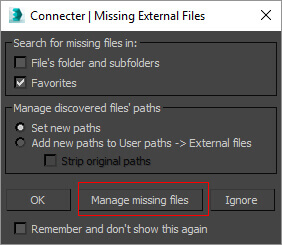
<p>The Connecter app makes this really quick and easy to do. It allows you to drag &#8216;n drop your models from the app directly in to the 3ds max viewport. After merging the model into the scene, the app will prompt you to relocate the texture paths if they aren&#8217;t matching. If you are dragging in old models you have already mapped textures to locally, the app won&#8217;t prompt you. In this case you can just use the <a href="//www.colinsenner.com/scripts/relink-bitmaps"><span style="color: #00ccff;">Relink Bitmaps</span></a> plugin to remap the links through a network path (as explained in Part II).</p>
<p>&nbsp;</p>
<p><a href="//ikonoform.com/wp-content/uploads/2016/07/connecter_missing_01.jpg"><img loading="lazy" decoding="async" class="aligncenter size-full wp-image-54695" src="//ikonoform.com/wp-content/uploads/2016/07/connecter_missing_01.jpg" alt="connecter_missing_01" width="282" height="245" /></a></p>
<p>&nbsp;</p>
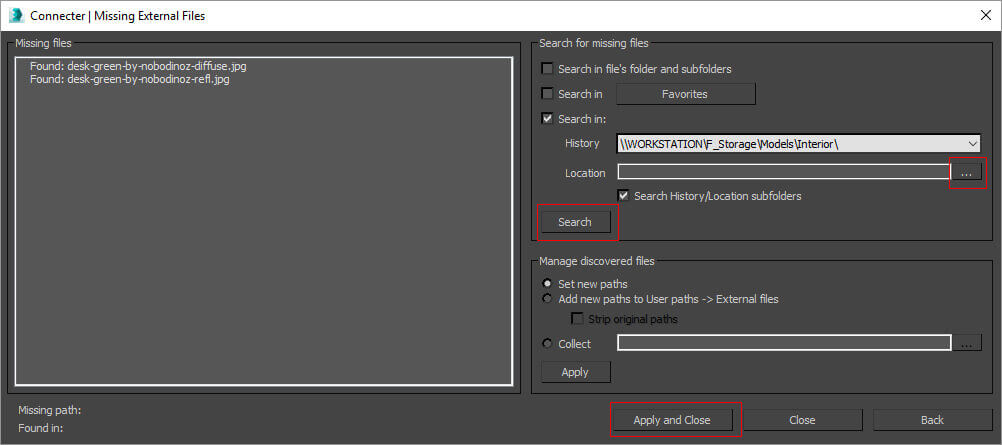
<p>To apply network paths to your new models, you need to browse for the location fairly close to the asset you are using.</p>
<p>&nbsp;</p>
<p><a href="//ikonoform.com/wp-content/uploads/2016/07/connecter_missing_02.jpg"><img loading="lazy" decoding="async" class="aligncenter size-full wp-image-54696" src="//ikonoform.com/wp-content/uploads/2016/07/connecter_missing_02.jpg" alt="connecter_missing_02" width="1002" height="445" srcset="https://ikonoform.com/wp-content/uploads/2016/07/connecter_missing_02.jpg 1002w, https://ikonoform.com/wp-content/uploads/2016/07/connecter_missing_02-300x133.jpg 300w, https://ikonoform.com/wp-content/uploads/2016/07/connecter_missing_02-768x341.jpg 768w, https://ikonoform.com/wp-content/uploads/2016/07/connecter_missing_02-700x311.jpg 700w" sizes="auto, (max-width: 1002px) 100vw, 1002px" /></a></p>
<p>&nbsp;</p>
<p>Here I&#8217;ve browsed to my &#8220;&#8230;/models/interior&#8221; folder and the app managed to find the missing assets in a subfolder. Next time you drag in a model, you can simply click the history tab and then click &#8220;search&#8221;. I&#8217;ve tried to add the same path to the &#8220;Favorites&#8221; button, but for some reason this doesn&#8217;t seem to work. The app is still in the beta stage, so things might change.</p>
<p>&nbsp;</p>
<p>The app does some work behind the scene and relinks the model you dragged in with it&#8217;s new paths. So the next time you drag that model in, the paths are remembered and will work with the render node. Pretty nice right?</p>
<p>&nbsp;</p>
<h4>Rendering your first job on the node</h4>
<p>&nbsp;</p>
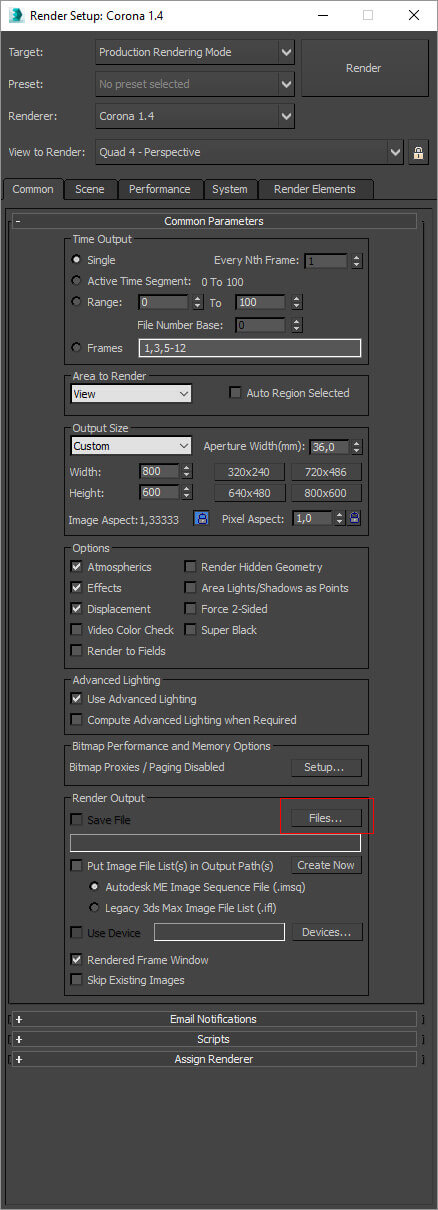
<p>In case you missed it in the guide from Autodesk on <span style="color: #00ccff;"><a style="color: #00ccff;" href="https://knowledge.autodesk.com/support/3ds-max/learn-explore/caas/CloudHelp/cloudhelp/2016/ENU/3DSMax/files/GUID-50FCDD2A-2D68-427C-B75E-65A0717FD2FC-htm.html">how to use backburner</a></span>, it&#8217;s crucial that you remember to specify where the render node should save the rendered image. If you forget this, the image is lost and you have to render again. So make this the first step when you set up the render job:</p>
<p>&nbsp;</p>
<p><a href="//ikonoform.com/wp-content/uploads/2016/07/Save_target_network.jpg"><img loading="lazy" decoding="async" class="aligncenter size-full wp-image-54702" src="//ikonoform.com/wp-content/uploads/2016/07/Save_target_network.jpg" alt="save_target_network" width="438" height="1210" srcset="https://ikonoform.com/wp-content/uploads/2016/07/Save_target_network.jpg 438w, https://ikonoform.com/wp-content/uploads/2016/07/Save_target_network-109x300.jpg 109w, https://ikonoform.com/wp-content/uploads/2016/07/Save_target_network-434x1200.jpg 434w" sizes="auto, (max-width: 438px) 100vw, 438px" /></a></p>
<p>&nbsp;</p>
<p>Remember to browse to the save location through the &#8220;Network&#8221; group and not &#8220;This PC&#8221; so you&#8217;ll get a network path &#8211; yeah I&#8217;m really trying to make you remember that you are now working via network.</p>
<p>&nbsp;</p>
<h5><strong>Render passes and file formats</strong></h5>
<p>&nbsp;</p>
<p>The same thing goes for your render passes. Save them to a network location (preferably the same as your normal image output. If you&#8217;re not feeling too fancy, I recommend 16- or 32bit tiffs as you get more image information (texture details and lighting) to play with later in Photoshop.</p>
<p>&nbsp;</p>
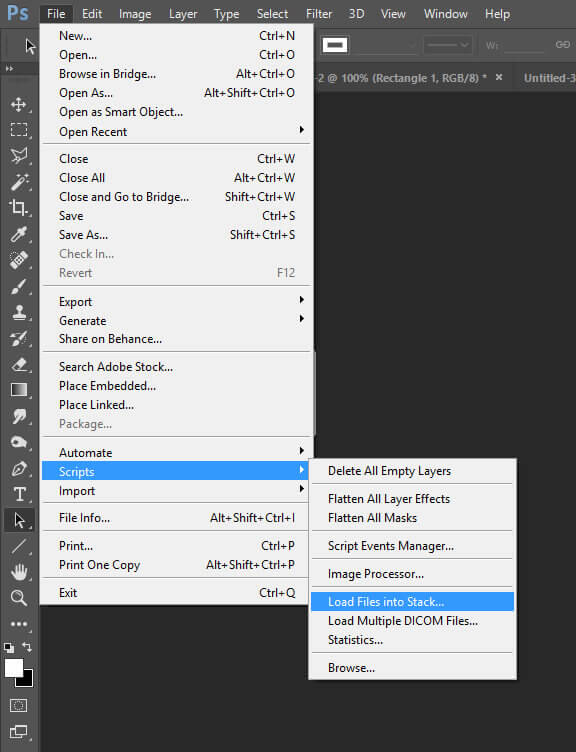
<p>In Photoshop you can load them all at once by using the &#8220;Load Files into Stack&#8221; option. Like this:</p>
<p>&nbsp;</p>
<p><a href="//ikonoform.com/wp-content/uploads/2016/07/PS_load_stack.jpg"><img loading="lazy" decoding="async" class="aligncenter size-full wp-image-54705" src="//ikonoform.com/wp-content/uploads/2016/07/PS_load_stack.jpg" alt="ps_load_stack" width="576" height="752" srcset="https://ikonoform.com/wp-content/uploads/2016/07/PS_load_stack.jpg 576w, https://ikonoform.com/wp-content/uploads/2016/07/PS_load_stack-230x300.jpg 230w" sizes="auto, (max-width: 576px) 100vw, 576px" /></a></p>
<p>&nbsp;</p>
<p>I hate all these separate render passes lying around in folders, it&#8217;s a mess. So what I find really great is to save my render output in the .exr format. This will result in just a single .exr file that includes everything (the main image and all your render passes).</p>
<p>&nbsp;</p>
<p>The only downside is that Photoshop can&#8217;t separate all those passes into layers unless you get the <del>50$</del> (It&#8217;s now free!) <span style="color: #00ccff;"><a style="color: #00ccff;" href="//www.fnordware.com/ProEXR/">ProEXR</a></span> plugin from fnord.  Update: There&#8217;s also a free plugin called <span style="color: #00ccff;"><a style="color: #00ccff;" href="//www.exr-io.com/">Exr-IO</a></span> this one seems a bit more user friendly, so I&#8217;ll personally try it out soon.</p>
<p>&nbsp;</p>
<h5><strong>Distributed rendering</strong></h5>
<p>&nbsp;</p>
<p>While it&#8217;s great to be able to send render jobs to the node and continue work on your workstation, there will be times where you&#8217;ll only have one big image to do or maybe an animation. This is where distributed rendering (DR) comes in handy.</p>
<p>&nbsp;</p>
<p>Basically, the DR option of your render engine will use both/all your available machines to work on just one single image.</p>
<p>&nbsp;</p>
<h5><strong>Speed up the start up</strong></h5>
<p>&nbsp;</p>
<p>If you want to save a little money on your electrical bill, turn off the render node when you know you won&#8217;t be needing it for a period of time. Mine doesn&#8217;t run during the night unless it&#8217;s actually working on an image. That meant that every time I would turn it on, I had to log on through TeamViewer to launch the Backburner Server, Corona DR server etc.</p>
<p>&nbsp;</p>
<p>You can make windows do that for you when the node starts up &#8211; also remove any password/login stuff on the node so you don&#8217;t have to type that in.</p>
<p>&nbsp;</p>
<p>Its really simple to do: <span style="color: #00ccff;"><a style="color: #00ccff;" href="//www.howtogeek.com/228467/how-to-make-a-program-run-at-startup-on-any-computer/">How to make a program run at startup on any computer</a></span> &#8211; quick and easy guide from howtogeek.com</p>
<p>&nbsp;</p>
<p>Now you can just power on the node, wait for it&#8217;s name to pop up in a TeamViewer notification or see it in the Backburner Manager on your workstation. You are now ready to start sending render jobs to it.</p>
<p>&nbsp;</p>
<h5></h5>
<h5><strong>Keep an eye on the CPU temperature</strong></h5>
<p>&nbsp;</p>
<p>During the many hours of work your node will heat up. The Xeons are build to operate well without damage at fairly high temperatures. Even though they are able to do this, I found it assuring to know that things weren&#8217;t overheating.</p>
<p>&nbsp;</p>
<p>On the node you can install a very simpel program called <span style="color: #00ccff;"><a style="color: #00ccff;" href="//www.cpuid.com/softwares/hwmonitor.html">HWMonitor.</a></span> Launch this when you are rendering your first render job and make sure the temperatures doesn&#8217;t go above 85 degrees celsius (185F). If they do, there&#8217;s something wrong with your CPU cooler or airflow through the case. If they don&#8217;t, be happy and check them again when summer time arrives.</p>
<p>&nbsp;</p>
<p><strong>Happy rendering!</strong></p>
<h4></h4>
]]></content:encoded>


			</item>
	</channel>
</rss>